WooliiPorterChina–EU Trade Tensions and Your Parcel: What You Actually Pay to Ship from China to the EU (2026–2028 Guide)
Tariff Policy & Compliance
Your first shipment starts with the China receiving address in your dashboard. Buy from your sellers, register their domestic parcels, then review and pay the shipping quote after the warehouse packs your goods.
A personal account is enough for this workflow. You do not need a Merchant Account to register parcels from several suppliers.
Two addresses, two jobs: give the China receiving address to your sellers; enter your own overseas address in the parcel registration form.
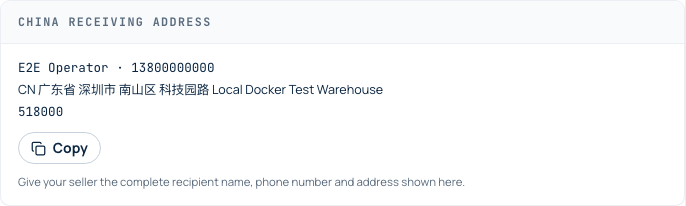
Sign in and open your dashboard. New accounts see the first-shipment guide near the top. Find the China receiving address card and select Copy. The address is also available beside the parcel registration form.
Give your seller the full recipient name, phone number, address and postcode exactly as displayed. Use the current details in your own dashboard, not the sample address in this article.
If a pure-battery warehouse option is available, follow its destination and receiving instructions. Register pure batteries separately and use their designated receiving address.
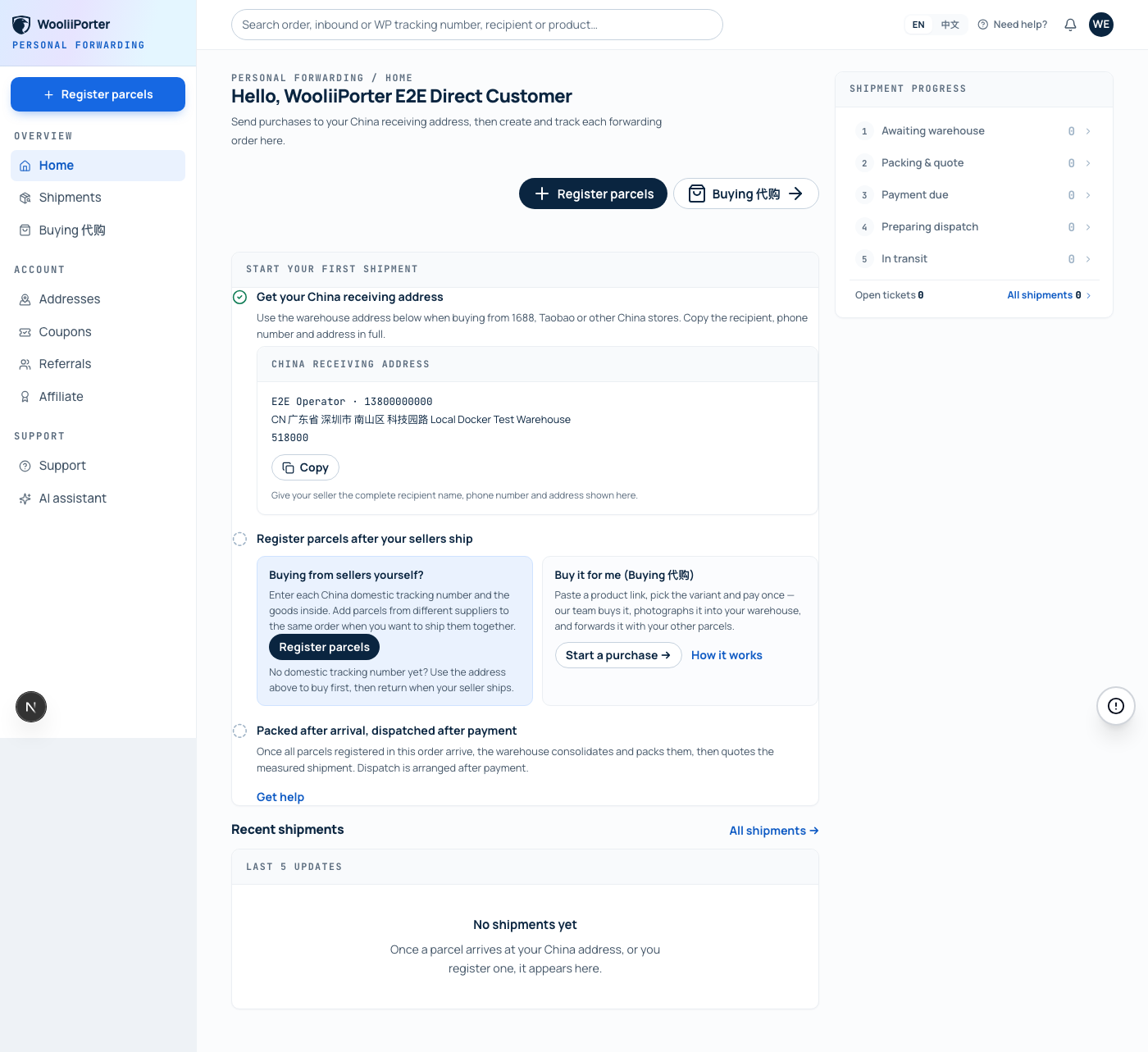
Place and pay for your purchases on 1688, Taobao or your chosen store. Use the copied China receiving address at checkout.
When each seller dispatches, ask for the China domestic courier tracking number. This tracks the parcel from the seller to the warehouse. The store's order number is a different reference.
If one seller sends two domestic parcels, keep both tracking numbers. If the seller has not dispatched yet, wait for the tracking number before registering that parcel.
Open Register parcels. Add the parcels you want shipped together to the same order, with one entry for each China domestic tracking number.
Use Add another parcel for each additional tracking number, including parcels from different suppliers. Select or add the Overseas delivery address where you want to receive the shipment.
For a short explanation of a field, hover over or select the circled question-mark icon beside its label. On a phone, tap the icon.
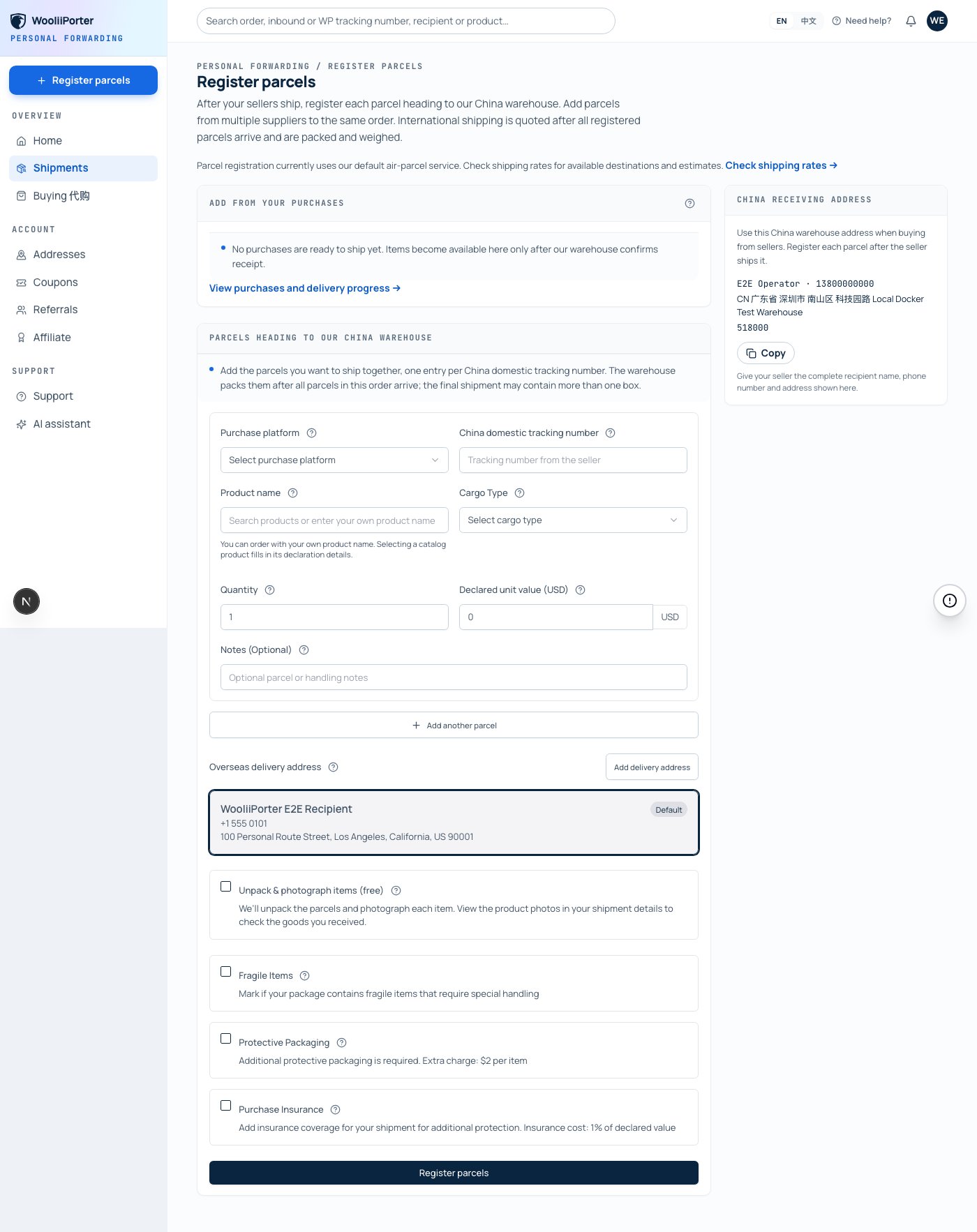
Select Unpack & photograph items if you want the warehouse to photograph each product. You can view the photos in your shipment details and judge whether the goods match your purchase.
You do not need to provide a detailed colour, size or model checklist. Packing does not wait for a separate photo-approval step.
You can also mark fragile goods, request protective packaging or select insurance where offered. Check the current form and shipping quote for the applicable charges.
For an EU destination, use your valid IOSS number if you have one. Otherwise select No IOSS, Skip. You can continue without one. See the EU VAT and non-IOSS rate table for the standard VAT rates and the 2% handling fee applied without IOSS.
Check the tracking numbers, product details and overseas address, then select Register parcels to submit.
Follow the order in Shipments. The warehouse receives the registered parcels and uploads product photos if you selected that service.
Once all parcels in the order have arrived, the warehouse packs them and prepares the shipping quote. You do not need to submit a separate consolidation request or approve the packing.
One order may contain more than one outbound box. The final packing depends on the goods and shipping requirements. The quote uses the warehouse's actual packed measurements.
When the quote is ready, open the order and select Review and pay. Check the packed measurements, freight charge, selected extras, taxes where applicable and any available discount.
Pay using an available checkout method. If you have already authorised wallet automatic payment, check the order's payment status first.
After payment is settled, the warehouse arranges dispatch. Follow the shipment's WooliiPorter tracking number and updates on the order page as they become available.
Personal parcel registration currently uses the default air-parcel service. Use the shipping calculator to check available destinations and estimates. Ask support about current sea-freight availability before buying for that service; upgrading to a Merchant Account does not by itself make sea freight available.
In the calculator, choose Australia, enter the Sydney delivery postcode and the appropriate cargo type, then enter 10 kg and the estimated carton dimensions of 48 × 38 × 34 cm. The result is an estimate; the final quote follows the packed measurements and available service.
The buying service is a separate purchase workflow for supported products. Its goods payment and the later international forwarding quote are separate steps.
Open a support ticket and include the order number or domestic tracking number. Contact support before dispatch if you need an issue reviewed.
Ready for your first order? Open your dashboard, copy the receiving address and return to Register parcels after your sellers ship.
After email verification, copy your China receiving address from the dashboard. Buy from your seller, then register each domestic parcel after the seller ships.