Supplier parcel forwarding
You choose your suppliers, products and purchasing terms.
WooliiPorter receives their parcels and links warehouse arrival records to your store orders.
WOOCOMMERCE · CHINA FULFILLMENT
WooliiPorter combines China logistics service with the technology that keeps store and warehouse work connected. Coordinate supplier parcels and stocked SKUs, select a logistics product, and follow order status, charges and tracking in one workspace.
SERVICE AND TECHNOLOGY
Build the service around how your store operates. Supplier forwarding supports products bought per order; warehouse inventory supports repeat fulfillment. Both connect to the same merchant records and logistics products.
You choose your suppliers, products and purchasing terms.
WooliiPorter receives their parcels and links warehouse arrival records to your store orders.
Hold stock for the SKUs that suit your sales pattern.
Warehouse inventory, reservation and pick-and-pack tasks keep repeat fulfillment organised.
Manage supplier-forwarded and stocked items in one store.
Stock checks and recorded mixed-order choices keep the fulfillment plan clear.
CONNECTED OPERATIONS
Your team makes purchasing and shipment decisions. WooliiPorter coordinates warehouse execution with background order and status sync, giving everyone a shared operating record.
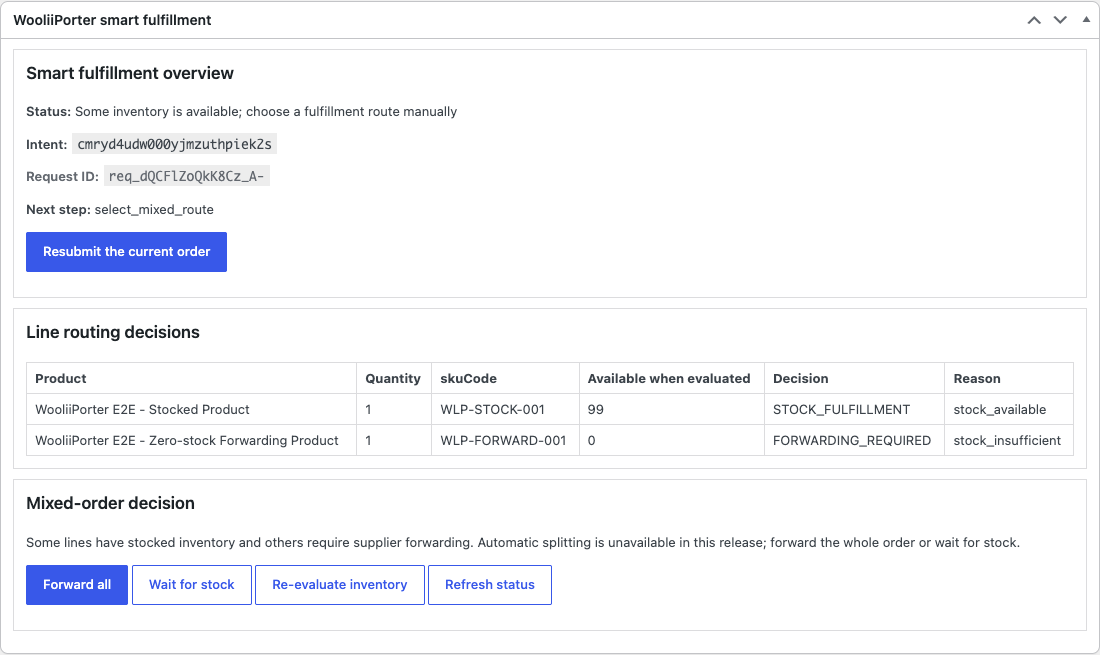
Mixed orders include a recorded choice of how the order proceeds.
WHO THIS IS FOR
You run a WooCommerce store and source physical goods from your own suppliers in China
You want to retain your own supplier relationships and purchasing terms
Some SKUs sell steadily enough to stock; others are low-volume or still being tested
You want one record covering receiving, packing decisions, quotes and tracking
FULFILLMENT PLANNING
Order-line stock checks prepare supplier forwarding or stocked fulfillment. Mark a product Always forward to use supplier parcels. Select a logistics product in the merchant workspace or use a saved channel default.
| Stock for that line | What happens | Typical SKU |
|---|---|---|
| None held | Supplier parcel forwarding. Your supplier ships to your China warehouse address. The parcel is received, scanned, photographed and matched to the order, then consolidated and forwarded. | Long-tail and test SKUs, suited to supplier-by-supplier fulfillment. |
| Enough held | Stocked fulfillment. Stock is reserved and the warehouse picks, packs and dispatches from your merchant-owned inventory. | Steady sellers where holding inventory shortens delivery. |
| Some, not all | Held for your decision. Choose to forward the whole order, wait for stock, or check inventory again. Your choice is recorded against the order. | A basket mixing a bestseller with a long-tail item. |
TRACKING AND MONEY
Receiving, value-added work, consolidation, dispatch and verified transport events appear in one timeline. The WooliiPorter public tracking number remains stable as the shipment progresses.
Available logistics products reflect destination coverage and shipment restrictions.
The parcel is measured after packing and quoted from current product prices. Freight and applicable fee items are shown for review before dispatch.
Estimates are always labelled separately from the final packed quote.
The final bill is a list of fee line items that reconciles against the packed quote, so a charge can always be traced to the operation that caused it. Storage appears only if you chose to hold stock, itemised on the monthly statement and computed from the same stock-movement ledger as your inventory.
Your lane table is in the console as soon as the account is active — connecting the store is what activates it. The public calculator shows personal-forwarding rates.
WHAT THE PLUGIN DOES
Test and connect validates the account, API-key environment and required scopes, then registers the store
Eligible orders reaching processing submit through Action Scheduler in the background
Fulfillment records, stock checks, required actions and diagnostic references remain attached to the WooCommerce order
Status updates arrive over store-bound webhooks signed with HMAC over the raw body
You enable automatic submission and choose the key environment during setup
Setup gives you control over order submission and product linking
WOOCOMMERCE · ON WORDPRESS.ORG
WooliiPorter Fulfillment for WooCommerce is reviewed and listed on WordPress.org. Install it from your wp-admin plugin search or the directory page, and updates arrive through the standard WordPress update channel. Product selection and the latest fulfillment alignment are available in merchant upgrade bundle 0.9.0 from the merchant console.
Search “WooliiPorter” in Plugins → Add New, or install from the directory page. Start with a sandbox API key; production access follows merchant activation.
Reviewed by the WordPress.org plugin team; updates ship through WordPress auto-updates.SERVICE ADVANTAGES
You control purchasing and supplier terms; WooliiPorter links supplier parcels to warehouse and order records.
Use supplier forwarding for per-order purchases and stock selected SKUs for repeat warehouse fulfillment.
Mixed-order choices, warehouse actions and shipment charges remain available in the operating history.
WooCommerce, Merchant API V1 and the standalone MCP server connect to the same merchant records. The Shopify app is listed on the Shopify App Store.
OTHER WAYS IN
Create orders in the merchant console or submit them from a custom system through Merchant API V1. Each entry point connects to the same fulfillment records.
Field notes / FAQ
You choose your suppliers and manage purchasing. WooliiPorter receives their parcels at your assigned China warehouse, links arrivals to store orders, and coordinates packing, shipment charges and delivery tracking.
GETTING STARTED
Create the account, submit the integration application from inside it, and install the plugin against a sandbox key first. Merchant terms are scoped to your real destinations and parcel pattern once we can see them.
Create a merchant login, submit business details and expected order volume, then complete human review and online signing. Your offer specifies services, freight discount and settlement currency. Shopify, WooCommerce, Amazon and direct API merchants follow the same process. Signing activates the merchant console and API-key management.